

How To Create a Special Offer and Boost Paid Conversions
It just might be the nudge your free subscribers need to upgrade!

First of all, HAPPY VALENTINE’S DAY
💗💗
For those who were unable to open the Substack checklist I mailed out a few days ago, my apologies. Substack did not handle the PDF attachment properly, so here is a direct link to it from my Google Drive. You can download it from there:
Let’s talk about special offers for your free subscribers:
Everyone loves a deal! They especially love deals on special occasions (like Valentine’s for instance), so why not create an opportunity for your free subscribers?
Substack makes it super simple to customize a discounted offer using the “Special Offer” feature.
You could also use this feature to set a monthly subscription amount below Substack’s minimum of $5/month. I’ve seen this use case done very well on Robin Wilding’s publication where she offers monthly rates of $1, 2, 3, or $4 per month.
Here’s how to find the special offer feature:
Go to your dashboard » settings » and type ‘special’ into the left search bar, and it’ll bring you here:
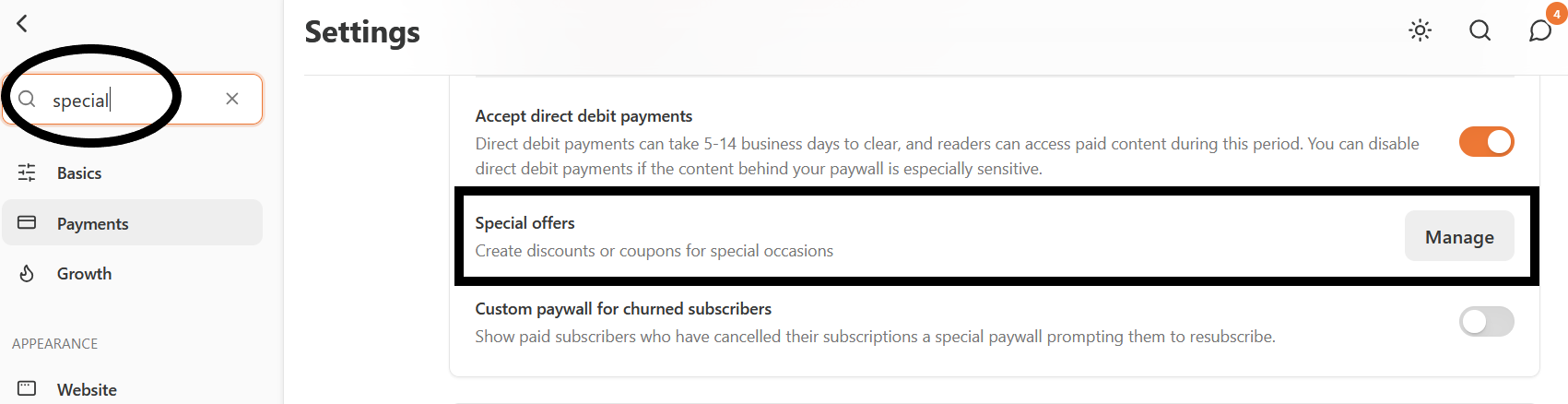
Then, click on the “Manage” button to access the page where you can create the offer.
(Pro Tip: You can quickly find anything in your settings by typing search words into the search box)
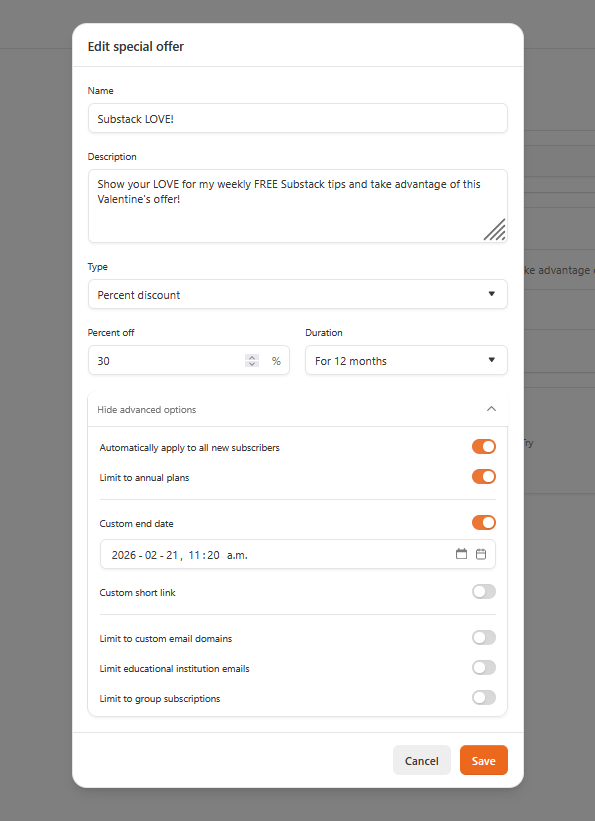
After you’ve clicked “Manage,” the following box will open. To expand this offer box, click “show advanced options” at the bottom. Then you can customize your offer details with a name and a brief description. Choose your percentage discount, duration, and custom end date, then click SAVE.
After you’ve created your offer, Substack will give you a unique link. Then you can create a custom button to insert into your posts with the link, and BAM! It’ll look just like this one:
If you click my orange button ⬆️, you’ll be taken to the page where you can see what the offer looks like and claim the discount on my annual subscription (YES… this is a real offer you can claim right now!)
If you’re not sure how to create a custom button, simply go to the BUTTON dropdown option in your draft toolbar. Near the bottom of that dropdown, you’ll see “custom.” Click on it and paste the link for your offer in the link field.
And there we have it! What special offer will you create next?

Speaking of special offers, my friend Ashley Evans has created a super simple guide for getting started on Substack without losing your mind 😁
If you’re looking for a low-effort, self-paced resource for getting yourself acquainted with the platform, check out her simple guide right here:
Once again, you offer GOLD to your subscribers. Thank you, Kristi, for your infinite Substack wisdom.🔥 AND thank you for the shout out about my Substack beginners guide “How to get started on Substack (without losing your mind)🫶🏼
PS. Your emails are designed beautifully, and written so clearly. My brain breathes reading them. 😊🧘♀️
Whoa 🤯 who knew?? All sorts of secret Substack tools. Thanks. I still gotta get on that welcome email tip you shared a couple of weeks ago. 😩