

How To Create Custom Landing & Sales Pages On Substack
These can help you showcase content and chapters, and sell products and services!

Substack makes rapid-fire changes to a LOT of things without notice. But one thing that has always remained is our ability to create custom Substack pages that we can use to highlight or sell literally anything.
First, what is a custom page on Substack?
Pages function differently from posts. When you create a custom page, it can either live on your navigation bar OR it can live “invisibly” and only people with the link will be able to access it. Both can be used brilliantly for very different purposes.

Purpose #1
If you look at my homepage navigation bar in the screenshot below, both nav bar links I’ve circled in black are custom pages.
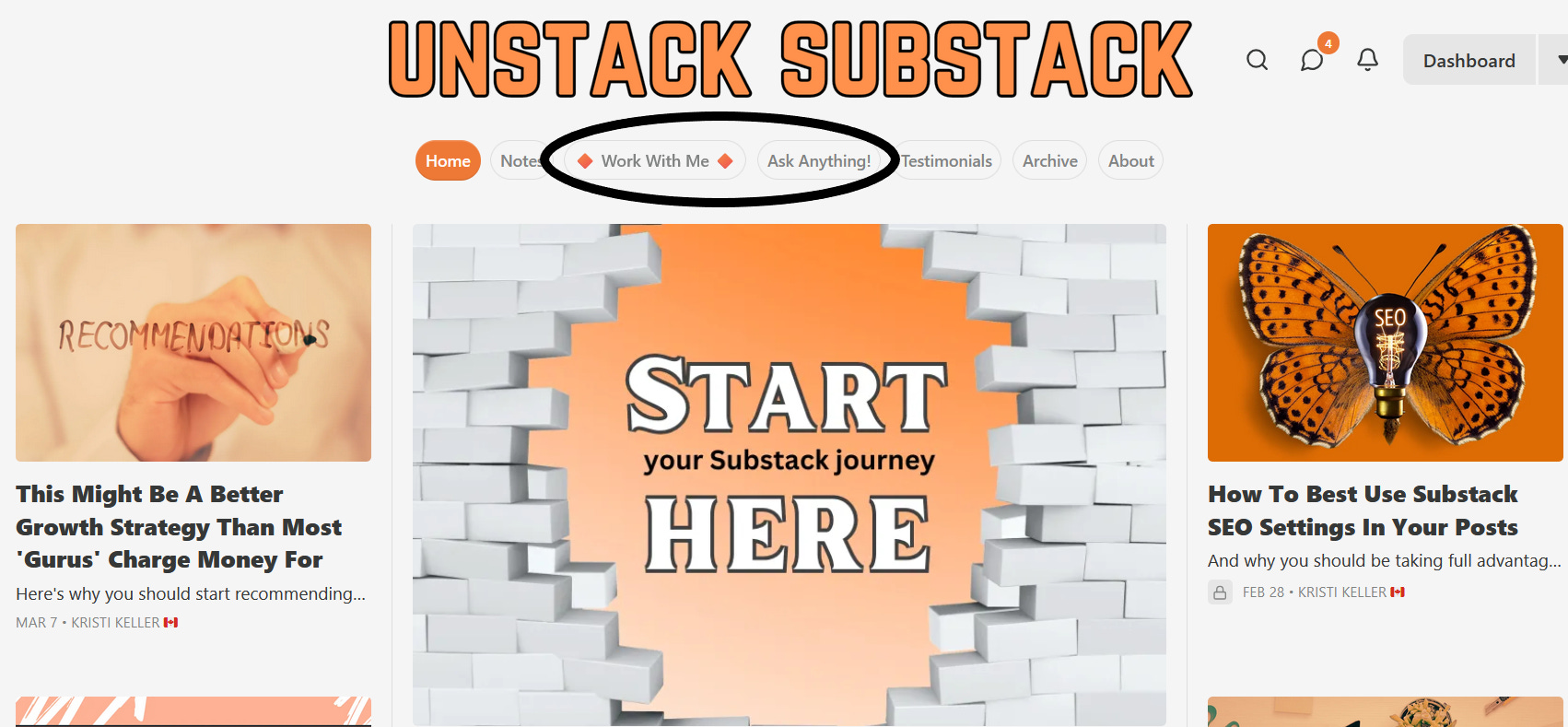
Now, here are links to those pages so you can see the possibilities for showcasing content:
On my “Work With Me” page, you will see that I have highlighted several ways Substackers can work with me, including custom buttons that link out to my business website, where readers can learn more about me and my Substack services.
On my “Ask Anything” page, you will see that I explain the details of how AA days work, and then I’ve included a catalogue of past AA days.
More examples:
Jennifer Probst uses a custom page to highlight details of her Write Naked course.
Jenna Newell Hiott uses a custom page to highlight a cornerstone collection of posts.
How to create custom Substack pages on your publication:
Here’s a quick step-by-step video tutorial I put together showing exactly how to create your own custom pages.
